이번 글에서는 Next.js 기반 프론트엔드에 UI 컴포넌트 라이브러리인 Mantine UI를 적용하는 방법과 저의 프로젝트에 적용 과정에서 발생한 SSR(Server Side Rendering) 관련 오류 해결 방법까지 다루겠습니다.
🧩 개발환경
- OS: Windows
- IDE: VS Code
- 형상관리: Git
- FE: Next.js 15.5.4 + React 18.3.1
- BE: FastAPI 0.118.2
- DB: Docker (PostgreSQL 15.14)
- 주요 패키지: Mantine 8.3.5, axios@1.12.2, next-auth@4.24.11, typescript@5.9.3
- 라우팅 방식: Next.js Pages Router (기존
/pages구조 사용)
1. Mantine UI란?
Mantine UI는 React 기반의 오픈소스 UI 컴포넌트 라이브러리입니다.
TypeScript와 SSR을 지원하며, 다크 모드, 스타일 시스템, 접근성(ARIA) 기능이 내장되어 있습니다.
주요 특징
- 🎨 깔끔하고 현대적인 디자인
- ⚡ 빠른 개발 속도 (컴포넌트 단위 구성)
- 🧩 TypeScript 완전 지원
- 🌙 Light/Dark Theme 지원
- 🧠 훅(Hook) 기반 유틸리티 제공
Next.js와 궁합이 좋고, 다양한 UI 요구사항을 쉽게 해결할 수 있습니다.
2. 라우팅 방식
✅ 라우팅 방식: Pages Router
Next.js에는 두 가지 라우팅 방식이 있습니다.
| 구분 | 설명 | 특징 |
|---|---|---|
| Pages Router | /pages 디렉토리 기반의 전통적 라우팅 | 구조가 단순하고 직관적 |
| App Router | /app 디렉토리 기반의 최신 라우팅 | Server Components 지원, SEO에 유리 |
이번 프로젝트는 Pages Router 방식을 사용했습니다./pages/index.tsx → /, /pages/about.tsx → /about 형태로 매핑됩니다.
3. Mantine UI 설치
frontend 디렉토리에서 다음 명령어를 실행합니다.
npm install @mantine/core @mantine/hooks @mantine/notifications @mantine/modals추가로 폼 기능이 필요하다면 아래 패키지도 함께 설치하세요:
npm install @mantine/form
4. _app.tsx에 MantineProvider 적용하기
Mantine UI는 프로젝트 전체에 전역 Provider를 설정해야 합니다.
Next.js Pages Router에서는 frontend/pages/_app.tsx 파일에 설정합니다.
// pages/_app.tsx
import type { AppProps } from 'next/app';
import { MantineProvider } from '@mantine/core';
import { Notifications } from '@mantine/notifications';
import '@mantine/core/styles.css';
import '@mantine/notifications/styles.css';

export default function App({ Component, pageProps }: AppProps) {
  return (
    <MantineProvider
      defaultColorScheme="light"
      theme={{
        fontFamily: 'Pretendard, sans-serif',
        primaryColor: 'blue',
      }}
    >
      <Notifications position="top-right" />
      <Component {...pageProps} />
    </MantineProvider>
  );
}
이 설정으로 Mantine의 전역 스타일과 테마가 적용됩니다.
5. 첫 Mantine 컴포넌트 추가하기
frontend/components/HelloMantine.tsx 파일을 생성합니다.
import { Button, Text, Card } from '@mantine/core';

export default function HelloMantine() {
  return (
    <Card shadow="sm" padding="lg" radius="md" withBorder>
      <Text size="lg" fw={700}>
        Mantine UI 적용 완료 🎉
      </Text>
      <Text c="dimmed" mt="sm">
        Next.js + Mantine UI 조합으로 빠르게 UI를 구성해보세요.
      </Text>
      <Button color="blue" mt="md" radius="md">
        확인하기
      </Button>
    </Card>
  );
}
이제 pages/index.tsx에 추가합니다.
import HelloMantine from '@/components/HelloMantine';

export default function Home() {
  return (
    <main style={{ padding: '2rem' }}>
      <HelloMantine />
    </main>
  );
}
6. 발생 가능한 오류: “Cannot read properties of null (reading ‘useRef’)”
Mantine UI를 SSR 환경(Next.js 기본 설정)에서 바로 사용할 경우 아래와 같은 오류가 발생할 수 있습니다.
Cannot read properties of null (reading 'useRef')
이 오류는 Mantine 내부에서 window 또는 document 객체에 접근하려다,
서버 사이드 렌더링(SSR) 시점에는 해당 객체가 존재하지 않아 생깁니다.
즉, Mantine이 클라이언트 전용으로 렌더링되어야 하는데 SSR에서 실행되기 때문에 생기는 문제입니다.
7. ✅ 해결 방법: SSR 비활성화 (ssr: false 설정)
Next.js의 dynamic() 함수를 사용해
Mantine 컴포넌트를 클라이언트에서만 렌더링하도록 설정하면 문제를 해결할 수 있습니다.
// frontend/pages/_app.tsx
import type { AppProps } from "next/app";
import '@mantine/core/styles.css';
import '@mantine/notifications/styles.css';
import { Notifications } from '@mantine/notifications';
import { SessionProvider } from "next-auth/react";
import dynamic from "next/dist/shared/lib/dynamic";

const MantineProvider = dynamic(() => import("@mantine/core").then((mod) => mod.MantineProvider), { ssr: false });

export default function App({ Component, pageProps }: AppProps) {
  return (
    <MantineProvider
      defaultColorScheme="light"
      theme={{
        fontFamily: 'Pretendard, sans-serif',
        primaryColor: 'blue',
      }}
    >
      <Notifications position="top-right" />
      <SessionProvider session={pageProps.session}>
        <Component {...pageProps} />
      </SessionProvider>
    </MantineProvider>
  );
}
이 설정으로 인해 컴포넌트는 서버에서는 렌더링되지 않고, 브라우저에서만 실행됩니다.
🧠 SSR 비활성화를 권장하는 경우
| 상황 | SSR 비활성화 여부 |
|---|---|
| FastAPI REST API 기반의 CSR 구조 | ✅ 권장 |
| 관리자 대시보드 / 사내 서비스 | ✅ 권장 |
| SEO 중심 블로그 / 공개 콘텐츠 | ❌ 비권장 |
| 실시간 UI 렌더링 중심의 SPA | ✅ 권장 |
이번 프로젝트는 FastAPI와 REST 통신을 기반으로 하는 내부용 시스템이므로 SSR을 비활성화(CSR 전용) 했습니다.
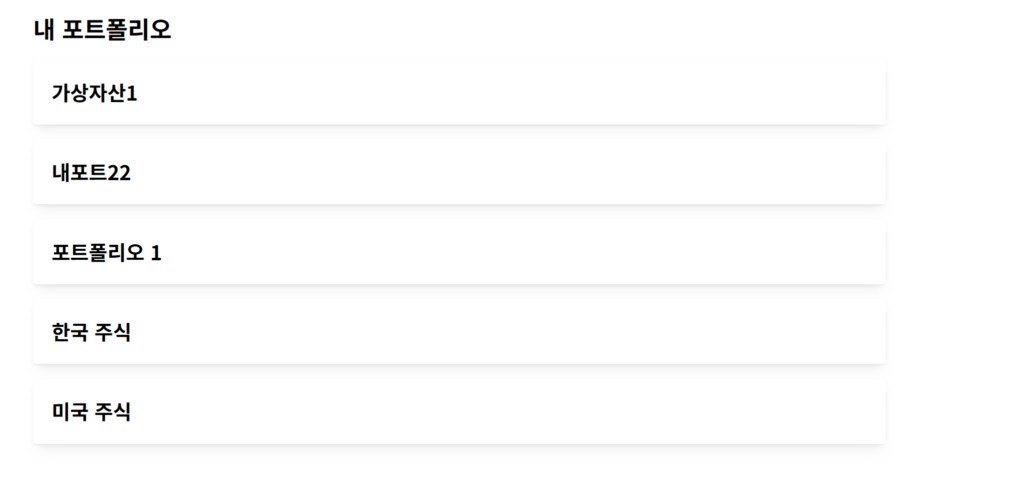
8. Mantine UI 적용 모습
9. 결론
Mantine UI는 Next.js + FastAPI 프로젝트에서
생산성과 디자인 품질을 동시에 높일 수 있는 강력한 UI 라이브러리입니다.
다만 SSR 환경에서는 window 객체를 참조할 수 없으므로,Cannot read properties of null (reading 'useRef') 오류가 발생할 수 있습니다.
이 경우 dynamic()을 사용해 SSR을 비활성화(ssr: false) 하면 안정적으로 동작합니다.
✅ 정리
- Mantine 패키지 설치
_app.tsx에MantineProvider추가- (필요 시) SSR 비활성화(
ssr: false)로useRef오류 해결